Larder
Order what you’ll sell. Sell what you have.
Larder is the AI waste platform for restaurants and F&B groups. It connects to the systems you already run, prices every leak, and tells owners, managers and servers exactly what to do next.
A product of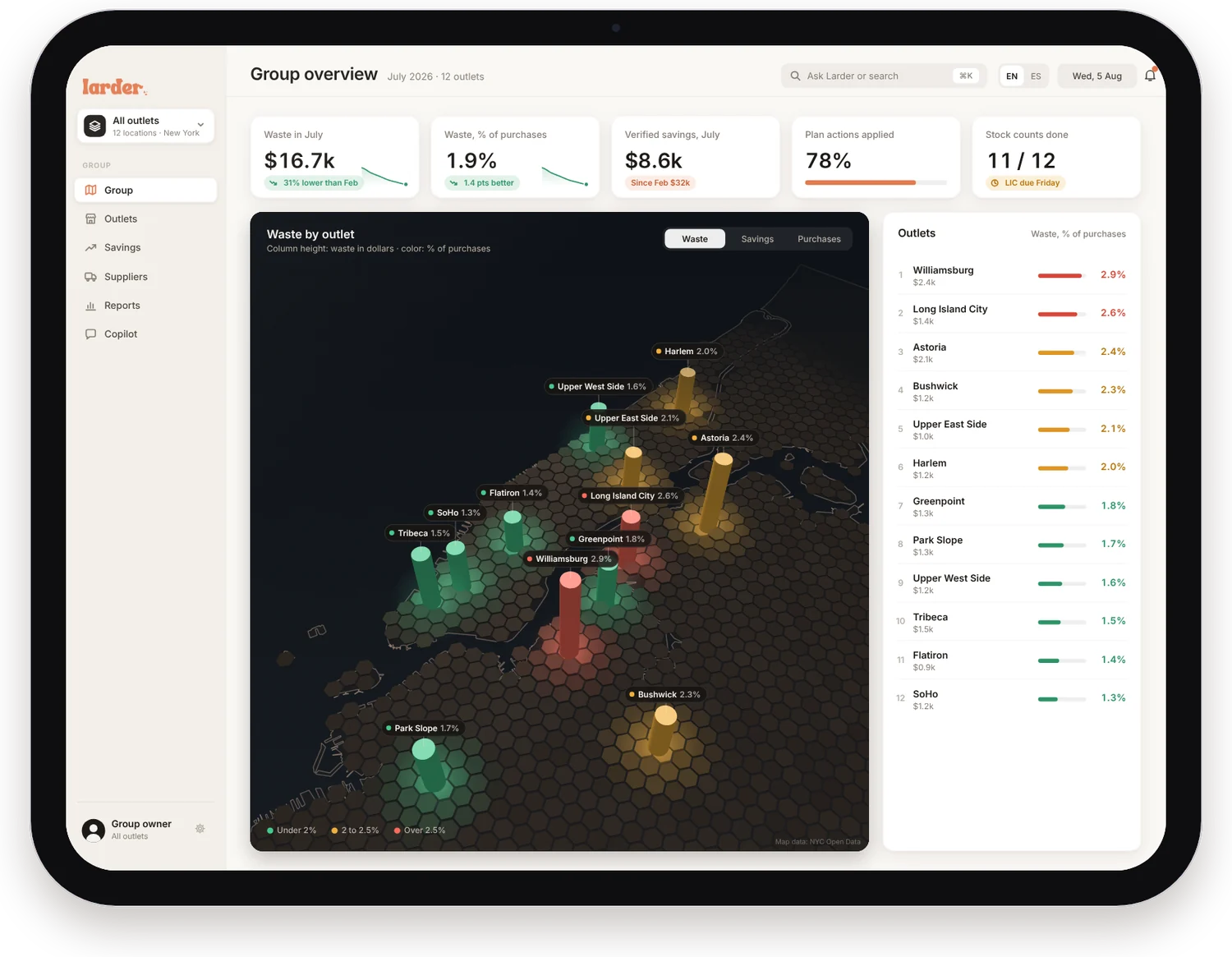
The problem
Every kitchen pays for food it never sells.
of food cost is lost to over-ordering, spoilage and portion drift.1
Waste starts with a guess.
Orders get placed on habit. Par levels drift. Prep is sized for a busy night that never comes. By the time anyone sees the cost, it is already in the bin.
What it costs you
Put a number on your bin.
Move the sliders to match your business. The range uses the 4–10% industry estimate.
Setup
Connects live to the systems you already run.
No scales. No sensors. No cameras. Just the data you already have.
AI waste report
AI analyzes your waste. Every leak, named and priced.
Each month Larder’s AI reconciles every invoice, sale and stock count, then names what leaked, why, and what it cost. Click a finding to see the reasoning, or export the whole report.
Findings
Each one named, priced and classified
Standardized reports, exported in one click: PDF for owners and finance, Excel for every editable number, CSV for your BI tools.
Roles
One ledger. Three views.
Everyone works from the same numbers. Each person sees what helps them act, and nothing else.
-
- Every outlet on one map, ranked by waste
- Savings verified against each outlet’s baseline
- Suppliers scored, transfers suggested
-
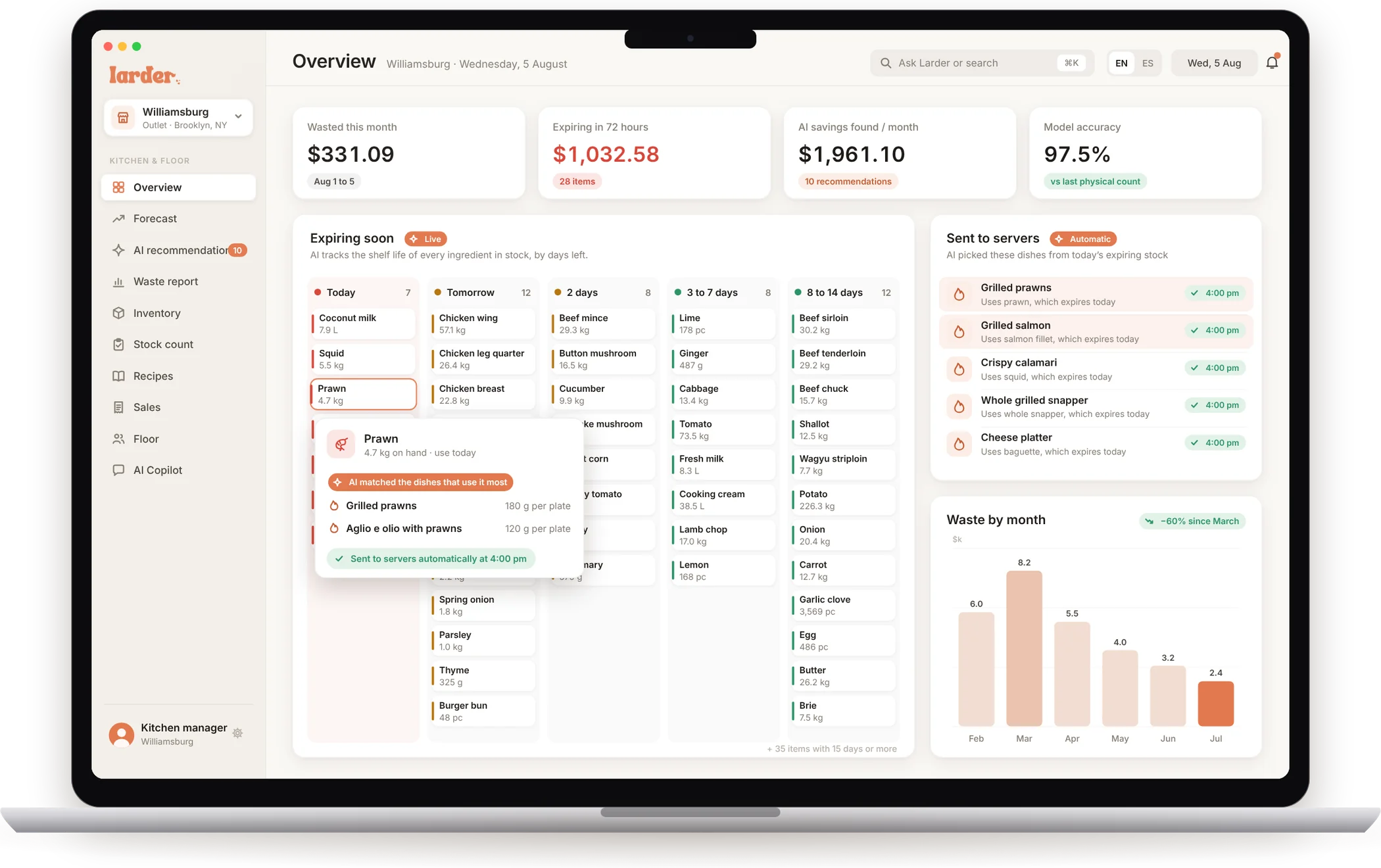
- Expiring stock, by days left
- Forecasts and purchasing recommendations
- Recipes, par levels and the AI Copilot
-
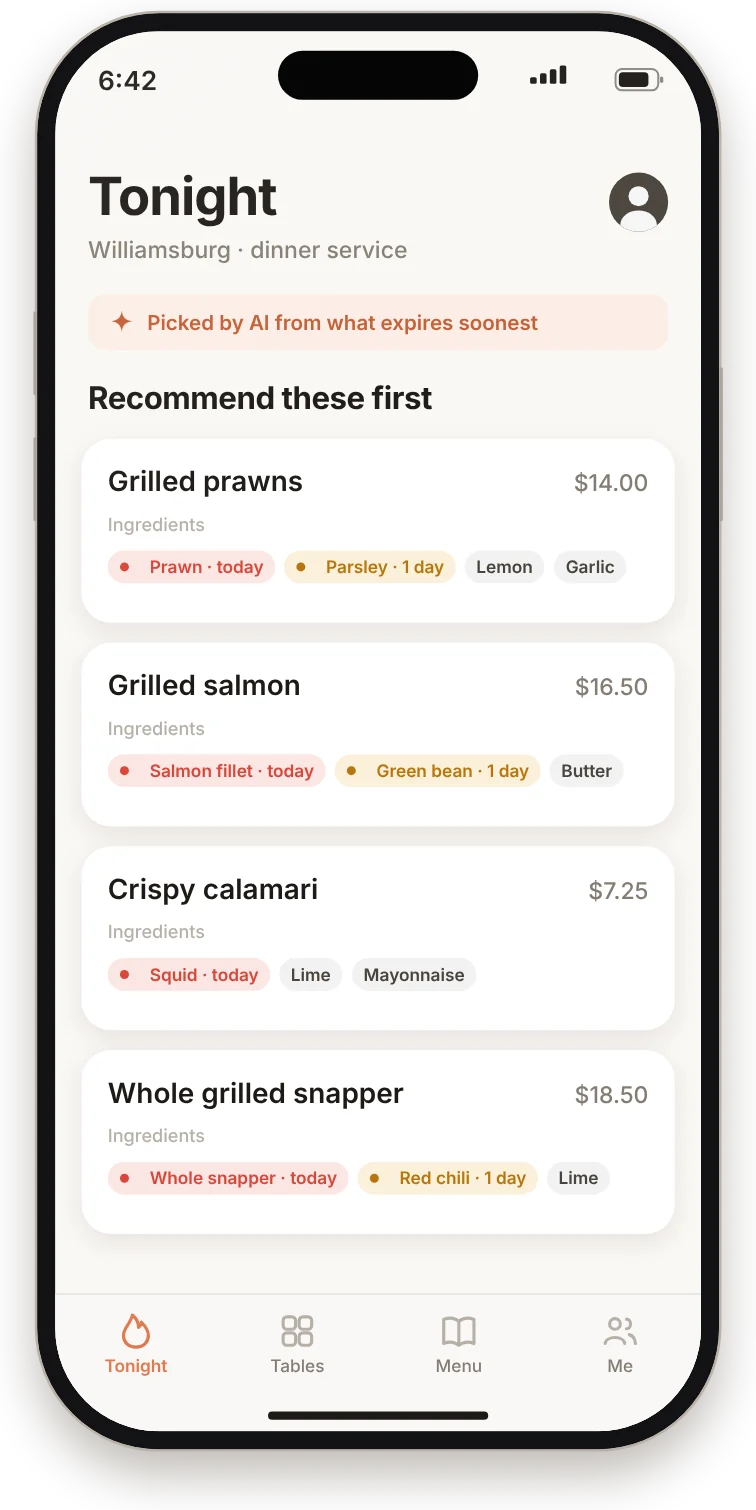
- Dishes to recommend, picked by AI
- Which ingredients expire, and when
- No costs. No spreadsheets. Just tonight.
For owners
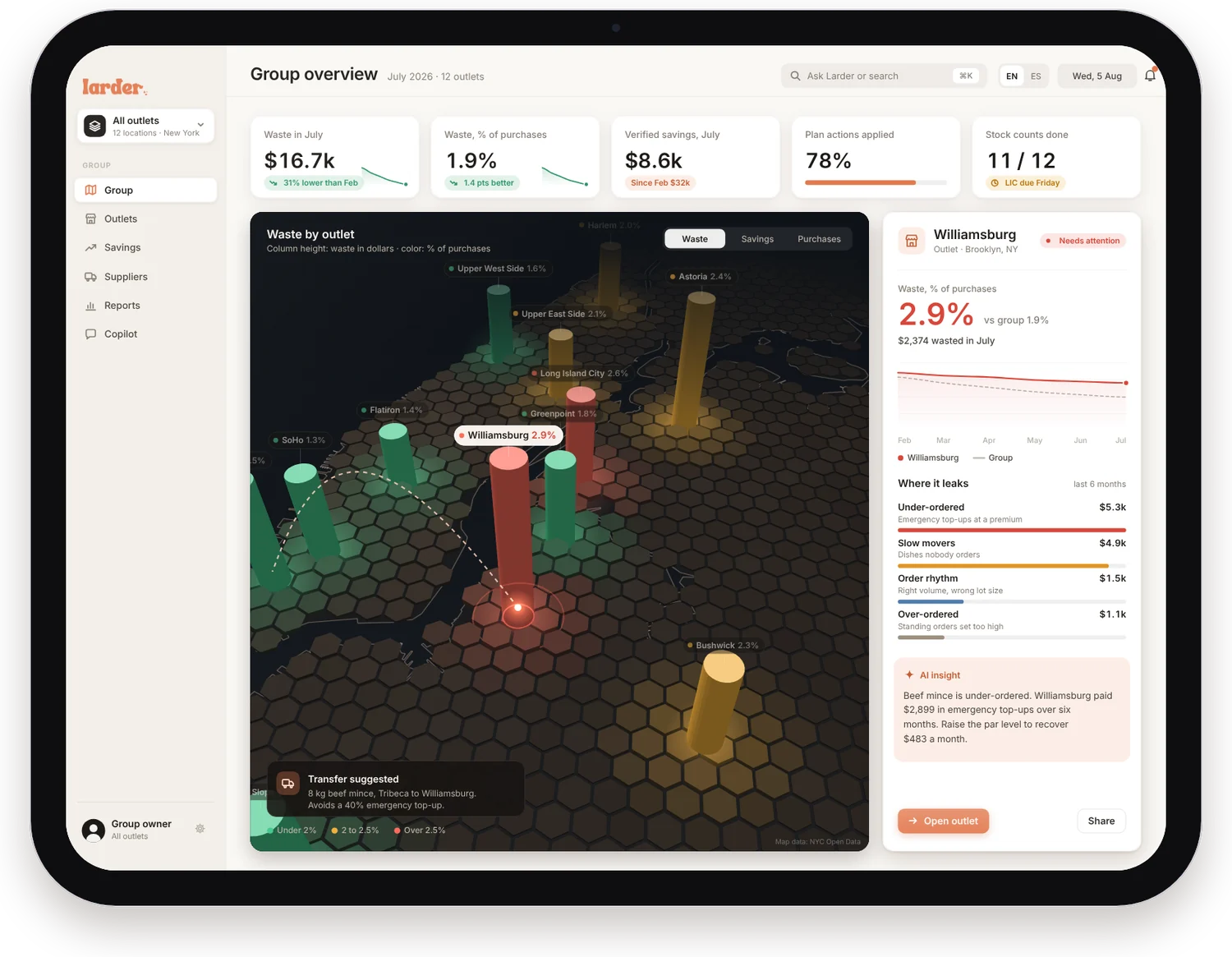
Every outlet, on one map.
Spot the outlet that’s leaking. Move stock between outlets, not into the bin. Drag the map to turn it, and pick any outlet to open it.
Sample group of 12 outlets. Map data: NYC Open Data.
For kitchen managers
The AI runs the stock. You run the kitchen.
Expiring stock, forecasts, purchasing and analysis, handled by AI and laid out so a manager can act in seconds.
AI spots what’s about to expire, and tells servers which dishes to sell.
Larder tracks the shelf life of every ingredient in stock. When something is close, the AI finds the dishes that use the most of it and sends them to the floor at 4:00 pm. Nobody has to push a button. Pick an ingredient marked AI to see the match.
Expiring soon
AI tracks the shelf life of every ingredient in stock, by days left.
Sent to servers Automatic
AI picked these dishes from today’s expiring stock
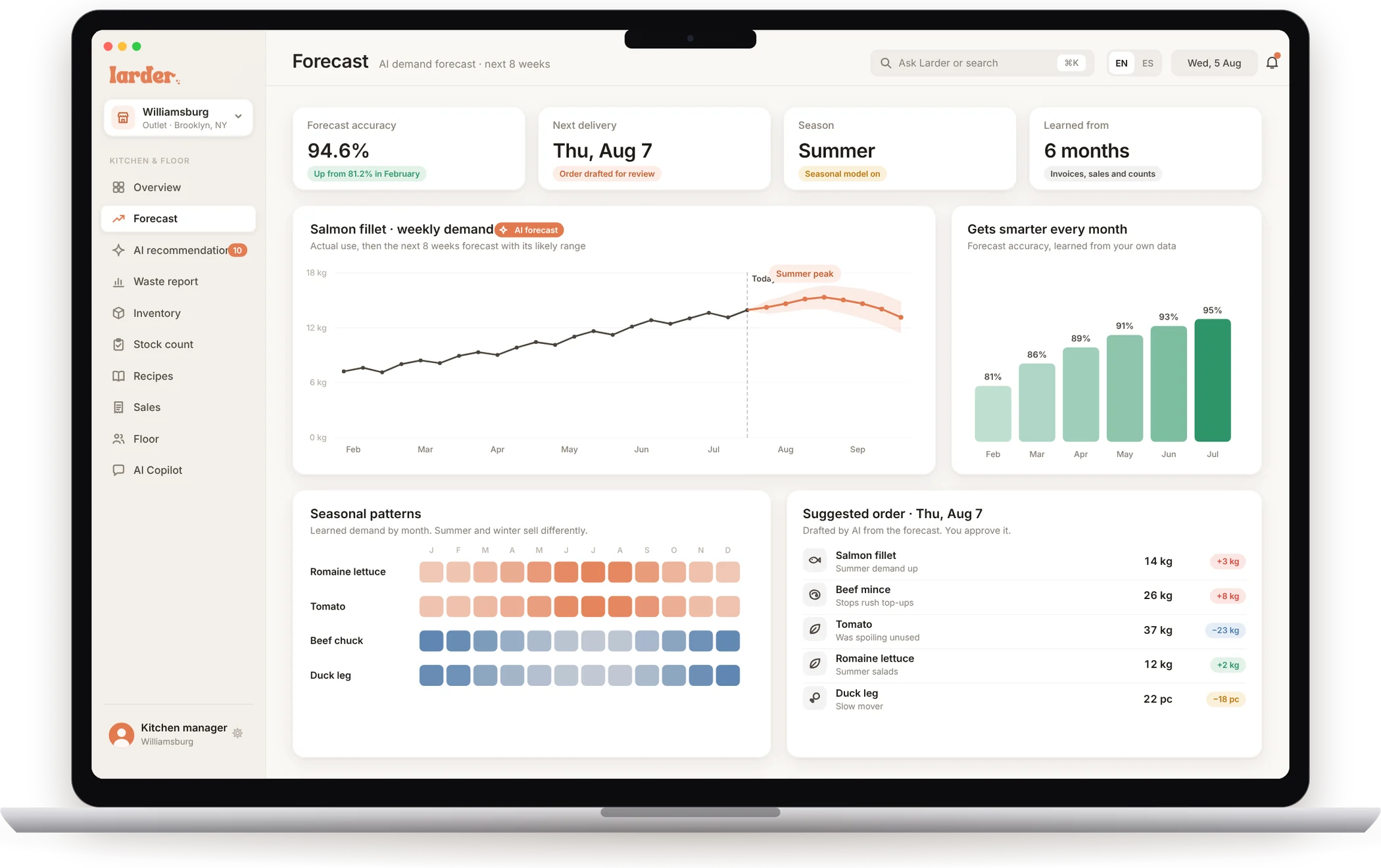
It learns every month and forecasts what to buy, season by season.
Larder gets smarter the longer it runs. It learns from each month’s waste, sales and counts, so the forecast tightens over time, and summer and winter are planned differently. Hover the chart, or drag through the year.
Salmon fillet · weekly demand AI forecast
Actual use, then the next 8 weeks forecast with its likely range
Gets smarter every month
Forecast accuracy, learned from your own data
Seasonal patterns
Learned demand by month. Summer and winter sell differently.
Suggested order · Thu, Aug 7
Drafted by AI from the forecast. You approve it.
AI recommends purchasing changes. You approve them.
Most teams don’t want software placing orders on its own. Larder doesn’t. Every recommendation shows the change, the reason and the monthly saving, and nothing changes until you press Approve. Try it.
$1,961.10 saved every month
Chat with an AI Copilot that analyzes your waste.
Ask in plain words. The Copilot reads your invoices, sales and counts, then answers with the numbers and the sources behind them. Pick a question, or type your own.
Analyzes your waste, purchasing and sales. Every answer comes from your own invoices, sales and counts.
For servers
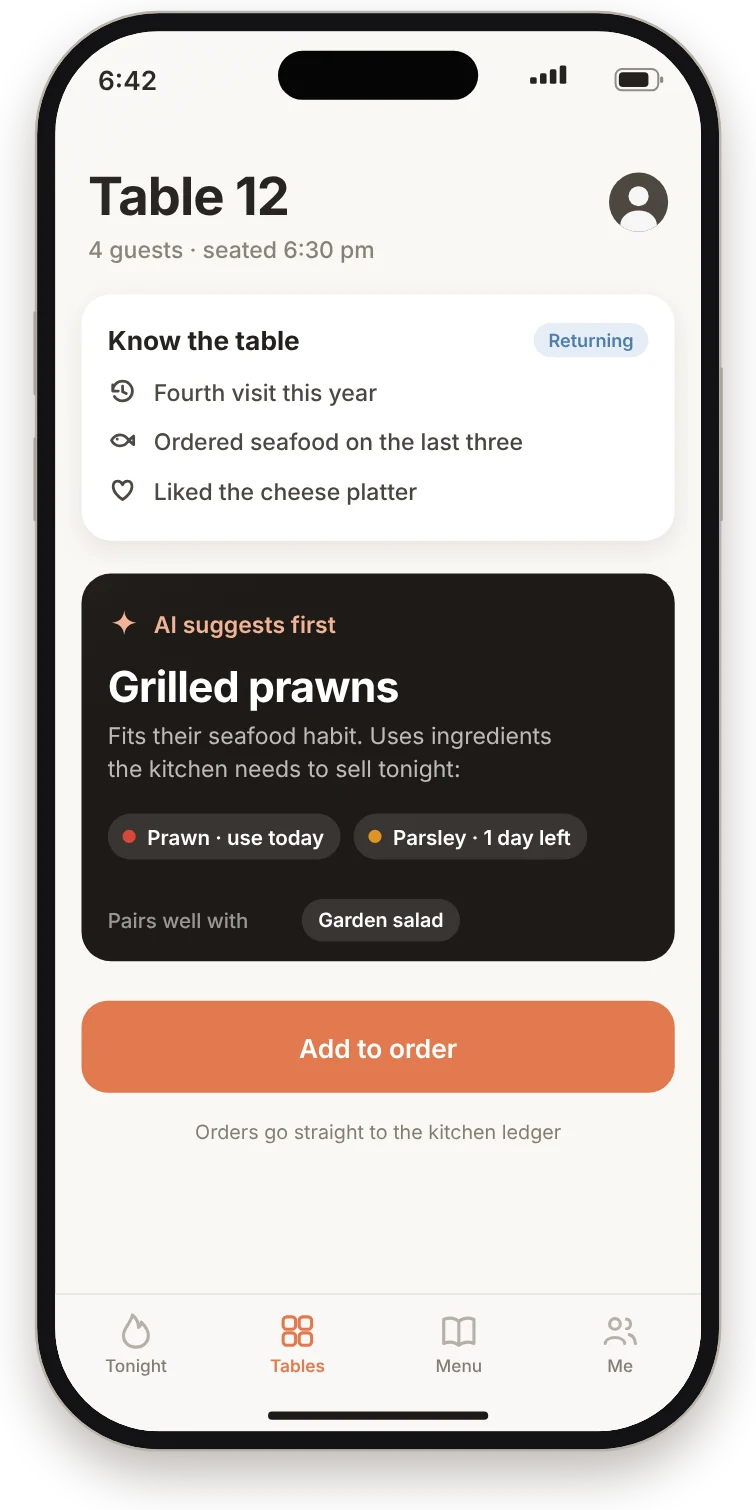
Servers get the dishes to recommend, picked by AI from what expires.
The floor team sees dishes, never costs. Each dish lists its ingredients, with the ones about to go bad marked, so the right plates get recommended before the stock turns.
- Tonight’s list. Dishes to recommend first, refreshed from the walk-in every afternoon.
- Know the table. Suggestions that fit what returning guests usually order.
- A shared target. Everyone sees how many AI picks the floor has sold.
No costs. No spreadsheets. Just tonight.
Tap the tabs. The phone works.
How it works
It reconciles what you buy against what you sell.
AI reads the paperwork. Deterministic math does the counting.
It runs on its own. Almost no manual work.
Invoices, sales and recipes keep the ledger current every minute of the day. Between counts, uncertainty creeps in, so once a month the kitchen does a single recount and Larder recalibrates.
The only manual task: recount your stock once a month and enter it. Larder recalibrates itself.
Estimate uncertainty · Butter
Each physical count pays down what sales volume cannot
- 1Connect your systems
Point of sale, inventory, supplier invoices, purchasing and billing.
- 2Load recipes and count once
Recipe quantities go in once. One opening stock count sets the baseline.
- 3Let Larder run
Alerts, forecasts, recommendations and reports, with one recount a month.
The film
Larder in 101 seconds.
The whole product, start to finish: the problem, the waste report, the three views, the AI, and how it all runs. Pick a chapter to jump in.
About
Larder is built by Aether AI.
Aether AI is a hybrid between venture capital and a venture studio. It invests in, acquires and develops niche artificial intelligence startups, with engineers and an in-house R&D team building alongside the founders.
FAQ
Questions, answered.
Do I need new hardware, scales or cameras?
No. Larder runs on the data you already have: your point of sale, inventory, supplier invoices, purchasing, billing, and your recipes. Invoices can come in as a photo, a PDF or a supplier feed, and the AI reads them.
How much manual work is there?
Almost none. Recipe quantities go in once and you do one opening stock count. After that, the only manual task is a recount once a month, which Larder uses to recalibrate itself.
Will the AI change my orders on its own?
No. Larder recommends purchasing changes, each with the reason and the monthly saving. Nothing changes until a manager approves it, and every approval updates the next purchase order.
How does it know what is about to expire?
It tracks shelf life per ingredient and supplier, and keeps a live ledger of stock: what was delivered, minus what was sold multiplied by your recipes, minus modeled spoilage. When something is close, the AI matches it to the dishes that use the most of it and sends those dishes to servers.
How does forecasting handle seasons?
It learns demand month by month from your own invoices, sales and counts, so summer and winter are forecast differently, and forecast accuracy improves the longer Larder runs.
Does it work across several outlets?
Yes. Owners see every outlet on one map, ranked by waste as a share of purchases, with savings verified against each outlet’s own baseline. Larder also suggests moving stock between outlets before it spoils.
What do servers see?
Only what helps them sell: the dishes to recommend tonight, the ingredients in each dish, and which of them expire soon. Servers never see costs.
Can I export reports?
Yes. Every report exports as a PDF for owners and finance, an Excel workbook with every number editable, or CSV for your BI tools. You can also schedule a monthly email.
Less waste. More margin.
See Larder on a walkthrough of the owner, manager and server views, and how it would connect to your kitchen.